
Upbit Exchange, Reviewed Honestly by an Independent Auditor
Upbit is a centralized, custodial exchange operated by Dunamu Inc. and the dominant venue for Korean won trading. We explain how it works, what it really costs, and the security trade-offs nobody in marketing wants to mention.
iThis is not the official Upbit website. up-bit.xyz is an independent educational guide and is not affiliated with, endorsed by or operated by Dunamu Inc. or Upbit.Disclaimer: this is an independent guide, not the official site. Not financial advice.
What Upbit actually is
Upbit is a centralized cryptocurrency exchange (CEX) operated by Dunamu Inc. and launched in 2017. By trading volume it is consistently South Korea's largest exchange, and it is one of the most active venues in the world for fiat-to-crypto trading denominated in Korean won.
The word that matters most here is custodial. When you hold coins on Upbit, the exchange holds the private keys on your behalf — much like a bank holds your cash. You get an account balance and an IOU, not direct control of the asset on-chain. That arrangement is convenient and it is also the single biggest thing you need to understand before you deposit a cent.
Good to know
All figures in this guide are taken from the official site (upbit.com) at the time of writing. Exchanges change fees, listings and regional rules frequently — always confirm the current numbers on the official site before you act.
How Upbit works: KRW, BTC and USDT markets
Upbit organises trading into three market types. Each one quotes coins against a different base currency, and the base currency you choose changes both the fee you pay and the assets available.
- KRW market — coins priced in Korean won. This is the deepest, most liquid market and the one most Korean users actually trade.
- BTC market — coins priced in Bitcoin. You first acquire BTC, then trade it for altcoins.
- USDT market — coins priced in the Tether stablecoin, useful for users who think in dollar terms.
Upbit supports 169+ digital assets according to official figures. The exact roster shifts as tokens are listed and delisted, and not every coin is available in every market or every region.
Spot trading, not a wallet
Upbit is primarily a spot exchange — you buy and sell assets for immediate settlement inside the platform. It is not a self-custody wallet and should not be treated as long-term cold storage. More on that distinction below.
Upbit trading fees (official numbers)
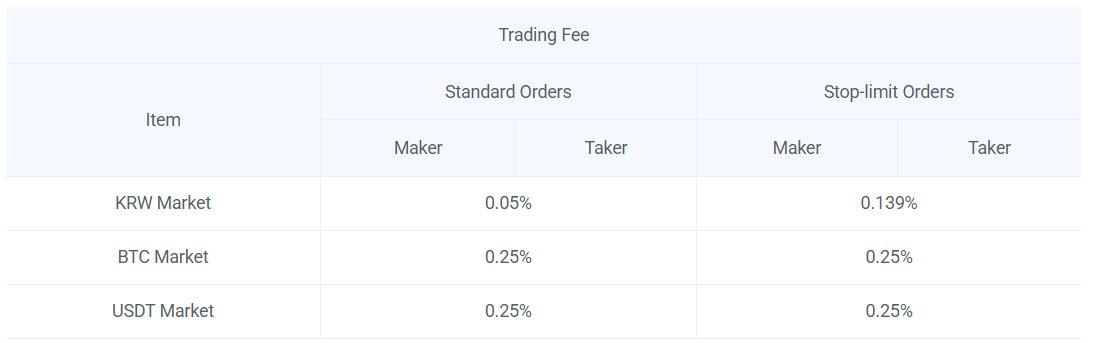
Fees are where a lot of guides get vague. Here are the published numbers from the official site. They are competitive for the KRW market and ordinary for the crypto-quoted markets.
| Market | Maker | Taker | Notes |
|---|---|---|---|
| KRW (standard) | 0.05% | 0.05% | Base fee for standard limit/market orders |
| KRW (reserve / stop-limit) | ~0.139% | ~0.139% | Higher fee tier for conditional orders |
| BTC market | 0.25% | 0.25% | Coins quoted in Bitcoin |
| USDT market | 0.25% | 0.25% | Coins quoted in Tether |
Two things to note. First, trading fees are not the same as network withdrawal fees — when you withdraw a coin on-chain you also pay a separate network fee that the blockchain demands, and for Ethereum (ERC-20) assets that fee can be painfully high during congestion. Second, the KRW reserve/stop-limit tier is materially more expensive than the standard 0.05%, so frequent use of conditional orders adds up.
FEES CHANGEFee schedules and promotional discounts move around. Treat the table above as a snapshot and verify on upbit.com before assuming a number is current.
Security and KYC, told straight
Upbit is a regulated Korean operator and applies real KYC (Know Your Customer) identity verification. That has consequences you should plan for rather than discover at the worst moment.
- Unverified accounts are limited. Until you complete identity verification, your account faces withdrawal restrictions. You may be able to look around, but moving funds out generally requires full KYC.
- Bank linkage. Korean won deposits and withdrawals typically require a verified, real-name bank account, which is a meaningful barrier for non-residents.
- Regional restrictions. Availability and features differ by country. Do not assume the Korean experience is what you will get elsewhere.
- Outages happen. Like every major exchange, Upbit has had periods of degraded performance during extreme volatility. Plan for the possibility that you cannot trade or withdraw at the exact moment you most want to.
On the protective side, enable 2FA (two-factor authentication) the moment you create an account, prefer an authenticator app over SMS where possible, and use a unique strong password you do not reuse anywhere else. In 2026, regulatory plumbing like the travel rule also means large transfers between platforms may require additional originator/beneficiary information — that is normal, not a scam.
PHISHINGThe most common way people lose funds on a CEX is not a platform hack — it is phishing. Only ever log in by typing the address yourself or via a saved bookmark. Never click a login link from an email, DM or search ad, and never enter your 2FA code on a page you reached by clicking a link.
Custodial vs non-custodial: the distinction that protects you
This is the single most important concept for any new user, so here it is in plain English. An exchange like Upbit is custodial — it holds your private keys, like a bank holds your money. A self-custody wallet (MetaMask, a hardware wallet) is your own safe: you hold the seed phrase, and if you lose it, no support desk on earth can reset it.
| Aspect | Upbit (custodial) | Self-custody wallet |
|---|---|---|
| Who holds the keys | The exchange | You alone |
| Recovery if you forget login | Support can help (KYC, email) | Impossible — lose the seed phrase, lose the funds |
| Counterparty risk | Yes — you trust Dunamu | No third party holds your coins |
| Ease of trading | High — built for it | Needs a DEX or bridge |
| Best for | Active trading, fiat on/off ramp | Long-term holding, full control |
The practical rule
Use Upbit for what it is good at — trading and converting fiat. Once you are holding an amount you would be upset to lose, withdraw it to a wallet where you control the keys. Read our wallet guide before you do.
NETWORK MISMATCH = BURNED FUNDSWhen you deposit or withdraw, the send network and receive network MUST match. Sending anERC-20token to aTRC-20address (or vice versa) can destroy the funds permanently with no recovery. Always confirm the network on both sides, send a tiny test amount first, and double-check the address character by character.
Pros and cons
Pros
- Deep liquidity and the dominant KRW market in Korea
- Low 0.05% base fee on standard KRW orders
- 169+ listed assets across KRW, BTC and USDT markets
- Regulated Korean operator (Dunamu) with real KYC
- Mature, well-tested mobile and web platforms
Cons
- Custodial — you do not control your private keys
- Strict KYC and real-name bank linkage limit non-residents
- Unverified accounts face withdrawal restrictions
- BTC/USDT market fees (0.25%) are unremarkable
- Regional availability varies; outages possible in volatility
- On-chain withdrawal fees (especially ERC-20) can be steep
How to get started
If you have decided Upbit fits your needs, here is the sensible order of operations. Do not skip the security steps.
Create the account
Sign up on the official site, then immediately set a unique strong password. See our login guide if you hit verification snags.
Turn on 2FA
Enable
2FAwith an authenticator app before anything else. This is the cheapest security you will ever buy.Complete KYC
Finish identity verification. Until you do, withdrawals are restricted, so handle this early rather than mid-trade.
Fund the account
Deposit KRW via your verified bank, or deposit crypto — confirming the network matches on both ends before you send.
Place a small first trade
Start tiny. Learn the order types and how fees are applied before you scale up.
Withdraw what you hold long-term
Move coins you intend to keep into self-custody. Send a small test transaction first, then the rest.
Who Upbit suits — and who should look elsewhere
No exchange is right for everyone. Be honest about which side of this line you fall on.
| Upbit suits you if… | Look elsewhere if… |
|---|---|
| You trade in Korean won and want deep KRW liquidity | You cannot link a Korean real-name bank account |
| You want low fees on standard spot orders | You need derivatives, margin or futures |
| You are comfortable completing full KYC | You require anonymity or minimal verification |
| You will move long-term holdings to self-custody | You expect the exchange to be your permanent vault |
| You value a regulated, established operator | Your region is not properly supported by Upbit |
STUCK WITHDRAWAL?If a withdrawal is pending far longer than usual, do not panic and do not resubmit blindly. Check the network status for that coin (some chains pause or congest), confirm the transaction hash on a block explorer if one was issued, and contact official support through the app — never through a link someone sends you.
Frequently asked questions
No. This is an independent guide. The official exchange is at upbit.com. Always verify fees, listings and rules there.
Upbit is an established, regulated Korean operator with real KYC and security controls. But it is custodial, meaning you trust Dunamu to hold your coins. No exchange is risk-free — use 2FA, beware phishing, and move long-term holdings to self-custody.
Per official figures, the KRW market standard fee is 0.05% for both maker and taker; conditional KRW orders are around 0.139%; and BTC and USDT markets are 0.25%. On-chain withdrawals also incur a separate network fee. Numbers can change — confirm on the official site.
Yes for meaningful use. Unverified accounts face withdrawal restrictions, and KRW funding generally requires a verified real-name bank account. Complete identity verification early.
Availability and features vary by region, and the Korean won market depends on a Korean bank linkage. Check whether your country is supported before signing up — do not assume.
For active trading, yes, short-term. For anything you intend to hold, withdraw to a self-custody wallet where you control the seed phrase. A custodial balance is an IOU; cold storage is ownership.